

Bridging the Gap: The Engineering Behind Takeer’s Web-to-Physical POS Flow
There is a common frustration in modern retail. You see something you like online, you call the shop to ask if it’s available, they say "yes," but by the time you drive there, it’s been sold. Or conversely, you order online, but you are hesitant to pay the full amount before seeing the product with your own eyes.
E-commerce and Brick-and-Mortar stores have historically been treated as enemies. At Takeer, we treat them as partners.
We have engineered a seamless flow that allows a transaction to start on a smartphone screen and finish at a physical counter. Here is how our Web-to-Physical Point of Sale (POS) integration works.
The Hybrid Order Journey
We realized that for local commerce to flourish, flexibility is key. Not every customer wants to pay 100% upfront online, and not every business wants to handle shipping logistics for local buyers.
Here is the Takeer solution:
1. Start Online (The Reservation)
Imagine a customer browsing a local furniture store on Takeer. They find a sofa they love. Instead of just "Adding to Cart" and hoping for delivery, they have options.
- Partial Payment: The customer can choose to pay a small deposit (e.g., 10%) online using their wallet or mobile payment.
- Instant Confirmation: This deposit secures the inventory. The system immediately deducts the item from the shop’s stock so no one else can buy it.
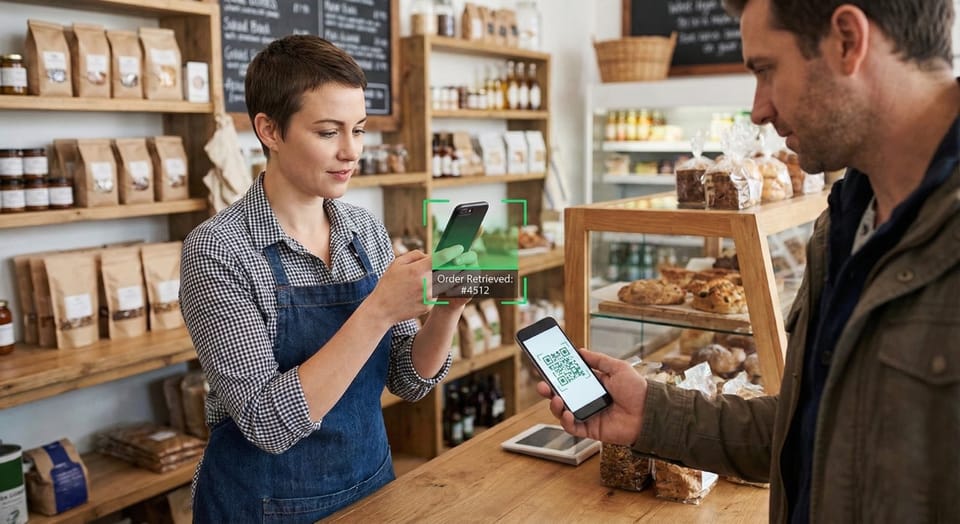
- The Digital Handshake: The customer receives a unique Order QR Code. This code holds all the data: the product details, the amount paid, and the amount remaining.
2. Finish Offline (The Settlement)
The customer drives to the shop. They don't need to explain who they are or find an email receipt. They simply show their QR Code.
- The Scan: The shop’s Sales Personnel uses the Takeer POS dashboard to scan the code.
- The Data: Instantly, the order details pop up on the staff’s screen. It shows exactly how much is left to pay.
- The Completion: The customer pays the remaining balance in cash or card at the counter. The staff marks the order as "Completed."
Why This Changes the Game
This flow sounds simple, but it solves complex problems for both sides.
For the Business Owner
- Security via Roles: You don't need to give your shop staff access to your entire Admin Dashboard or bank details. The Sales Personnel role is restricted—they can only access the POS features (Create Sale, Scan Order). They can process the customer's QR code without seeing your total business revenue or sensitive settings.
- Inventory Integrity: Because the online deposit instantly adjusted the inventory, you never have to worry about accidental double-selling.
For the Customer
- Trust: You don't have to send full payment to a stranger online. You can pay a small commitment fee and pay the rest only after inspecting the physical product.
- Speed: No waiting in line while the clerk looks up your name or order number. Scan, pay, leave.
The "Settled Order" Logic
When the transaction is completed offline, the Takeer system automatically reconciles the accounts. It combines the online deposit with the offline cash payment to mark the order as "Fully Settled" in your reports.
This creates a single source of truth. You no longer need one ledger for your website and a different notebook for your shop counter. It is all one ecosystem. Get started at takeer.com